Microsoft Word metadata
Introduction

Microsoft Word is one of the world most used programs, and its file formats (.doc, .docx and .docm) are widely used through the software world. However, there is a lot more to these formats than meet the eye.
In addition to the words, formatting and other visible marks that the user inserts into a document, Microsoft also saves additional data that it can use, both in MS Word and Windows Explorer, which enable it to understand more about its creation and about the document generally. These are called “metadata” or, more formally, Microsoft Word document properties.
Some of these things you, the user, sets, either implicitly when the program is initially installed or explicitly for a particular document. Other things the computer calculates based on the document itself. And this all happens maybe without you knowing about.
Knowledge of this can be important for two reasons:
- Privacy. In a world where privacy is becoming increasing important, knowing what personal information you leave behind about your documents could be vital if you need to give documents, especially ones which are confidential, to others.
- Accessibility. Because Windows can natively read all of this information, it is possible for the computer to search and catalog it without needing to open the documents.
Unfortunately, Windows Explorer does not make it easy to retrieve this information, and even when you know how, it is not very user-friendly. There are much easier ways...
In this article, we will:
- Look at all the different metadata that are available in MS Word,
- Find out how to set and retrieve these document properties, and
- See the easiest way to catalog them, so that you can really use and control this. You’ll be amazed how easy it can be, and how useful it is.
MS Word Metadata Fields

The document properties for Microsoft Word can be grouped together as follows:
- Statistics. These are calculated each time a document is saved. The absence of this information can be a sign that the document doesn’t originate in MS Word, but another application, and has only been saved in a Word-compatible format. They are:
- Byte count (rarely used in this category – but see category 4 below),
- Character count,
- Word count,
- Line count,
- Paragraph count, and
- Pages.

- Creation properties. These are properties which are saved when the document is written for the first time, and are not generally changed thereafter. They are:
- Authors / Creators / Participants. These are generally the same, and are the user name in the originating computer.
- Company. The company of the original author.
- Content created (the Date when it was initially written),
- Manager (rarely used),
- Template (generally “Normal.dot” if it was originally a “Blank document”, but may be interesting for other values).
- Title (generally user-set for Word 2007 onwards, but may be a potential security problem for Word 2003 and before).
- Document-specific properties. This is information about the last user, and when certain actions were done. Most of these are document properties common to other Microsoft Office programs. They are:
- Date / Date last saved (when the document was last written - this can be superior to the Windows Explorer dates),
- Last printed (date),
- Last saved by (date),
- Revision number (user set),
- Security,
- Total Editing Time (in hours, minutes and seconds), and
- Version number (user set).
- Windows-generated and Windows Explorer data. Not Microsoft Office-specific document properties, because they are included with other document file types. They include:
- Attributes (hidden, system etc.),
- Categories,
- Date accessed,
- Date created,
- Date modified,
- Kind / Perceived type (generally “Document”),
- Size (in bytes),
- Tags, and
- Type (e.g. “Microsoft Word 97 - 2003 Document”).
- Folder and File Information. This is information which is directly set when you save the document, such as:
- Filename
- File extension (either “.doc”, “.docx” and “.docm”)
- Folder path
If you want to see how the above is used, see the article “What metadata is actually used in MS Word documents?”.


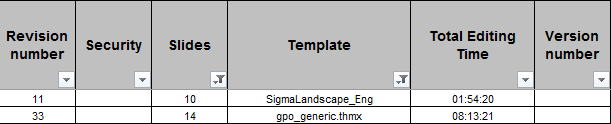
Accessing document properties in MS Word
Microsoft Office metadata can be edited in Microsoft Word in four different ways:
1. In Word’s File menu.
2. In Word's Document Panel (a standalone pane above the Word document)
3. In Word's Advanced Properties (a pop-up box), and
4. Using Visual Basic for Applications.
For more details, please click on the hyperlinks above.
Accessing document properties in Windows Explorer
MS Office document properties can also be accessed in Windows Explorer in three ways:
1. Viewing or editing a single file’s metadata, using the Details Pane,
2. Viewing or editing a single file’s metadata, using Properties,
3. Viewing (only) in Windows Explorer for multiple files, and
4. Searching through folders in Windows Explorer.
If you want more information on the above, including the disadvantages of relying on Windows Explorer, please see the article "Accessing MS Word document properties in Windows Explorer".
Cataloguing file properties
That you can see what sort of information is available, you probably want to know what the best way is to extract this data for not just one file, but for a folder or a series of subfolders.
The best way is to use a metadata extractor, which is a enhanced file cataloguer which not just gives you the information you can see in Windows Explorer, but all of the above properties and more. It will help your file management if you can see what data you have in your disposal.
Ideally, a good metadata extractor should be:
- Fast – you don’t want to wait to get your results
- Easy to start – if you are looking at a folder in Windows Explorer, just 2 clicks should be all you need.
- Easy to use – selecting what metadata you want to capture should be easy.
- Open-box – once the data has been retrieved, you don’t want the program to keep it to itself. You want (for example) to copy and paste the results.
- Create spreadsheets – if you want to, it should export the information into Excel.
- Find the information you need – you should be able to filter or sort on various columns.
- Create analyses – either in PivotTables or within the program.
- Be able to capture more metadata – not just the above MS Office document properties, but also for other kinds of files:
- photographs, pictures and images metadata, including GPS data,
- audio and video file properties, and
- email properties in Windows Explorer.
all of which have file properties of their own.
We needed a program to do all of these, and therefore we have developed two programs to do exactly the above:
Filecats Professional is our program for computers with Microsoft Excel.
- Filecats Professional enables you to export this metadata into MS Excel.
- From there, you have all the power of Excel at your disposal.
- Filter and sort your data. Copy and paste it into other programs.
- Email spreadsheets to colleagues.
- Create records of your files or of information being sent to you, for use later.
- Create powerful PivotTables and PivotCharts, easily (seriously – it’s easy!).
- And much more
Filecats Metadata is our program for computers which do not have MS Excel.
- Filecats Metadata imports the document properties into a self-contained table.
- From there, you can filter and sort your data, or copy and paste it into your favorite applications. You can then email or create permanent records of your information.
- You can create complicated analyses with just a couple of clicks.
There is a 7-day free trial for both of these programs, so you can test it out and see what information you can extract.
Now you know how important document properties are, why not download it and see what information is already present on your files (or in files you have been given from other people).
You will be impressed not just at the speed of it, but the extent of the metadata that is available, and now at your fingertips.
Not convinced? Have a look at the video below to see Filecats Professional in action.
If you have any comments about this article, please leave them below.
Read out more about: